How it works
embco runs one cycle every 15 minutes (or once, on demand). Each cycle reads the shop's purchase documents from ERPNext, checks every open invoice and remembers the result. When there is something to decide, the AI model is woken: it decides, pays what it chose to pay (if payments are on), sees what happened and acts on it.
One cycle
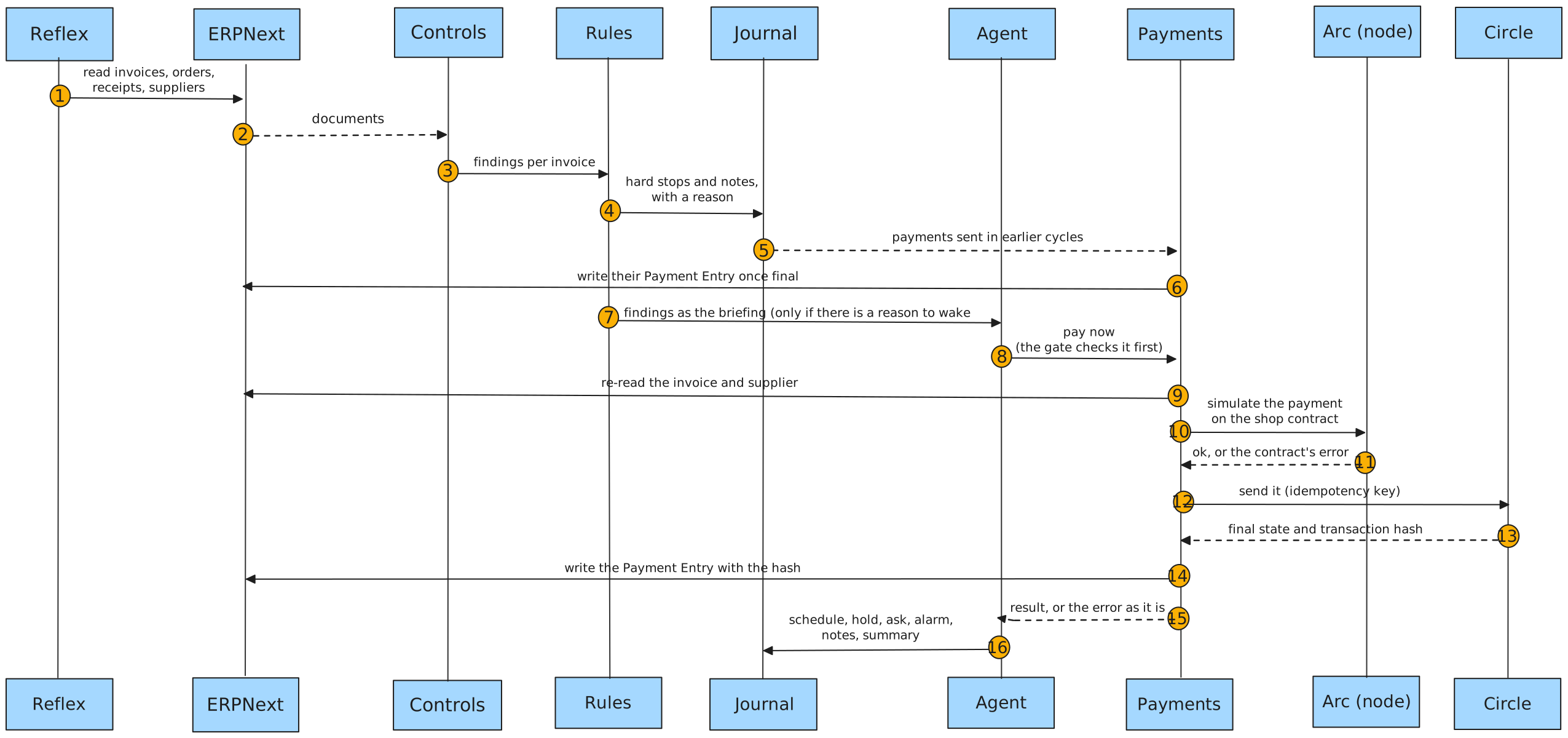
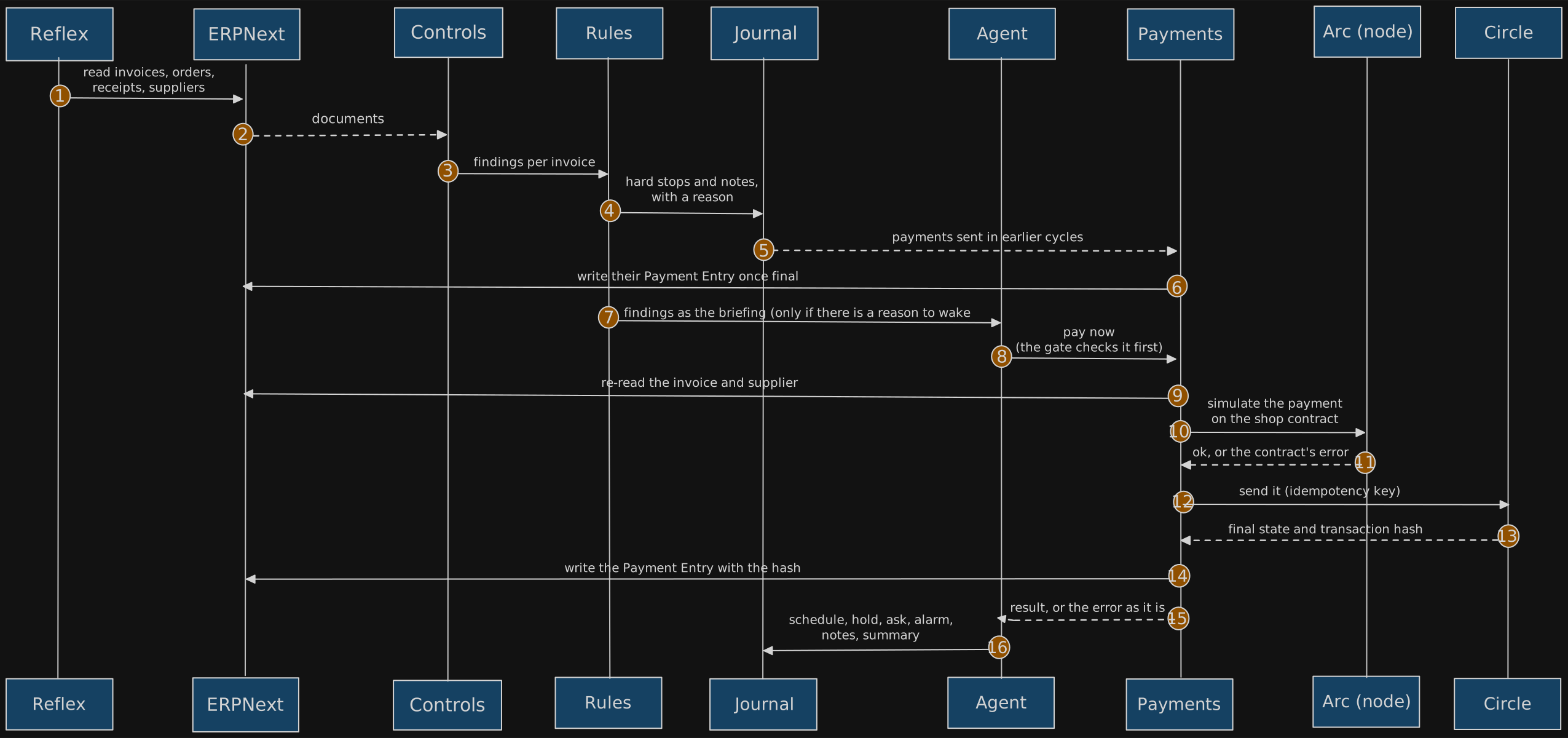
The fixed rule
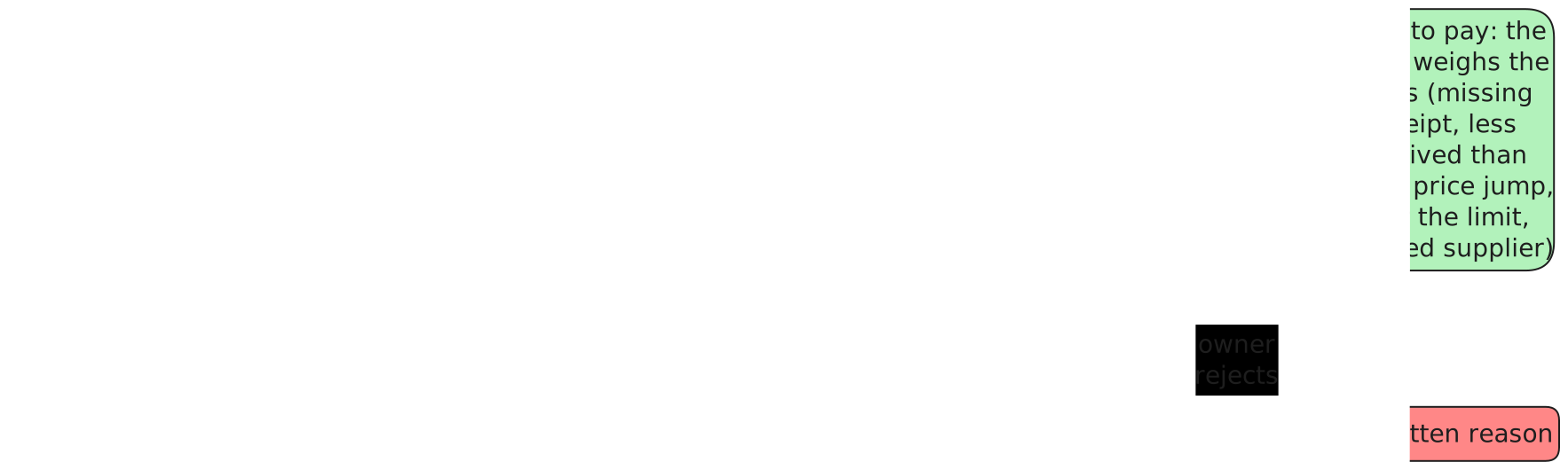
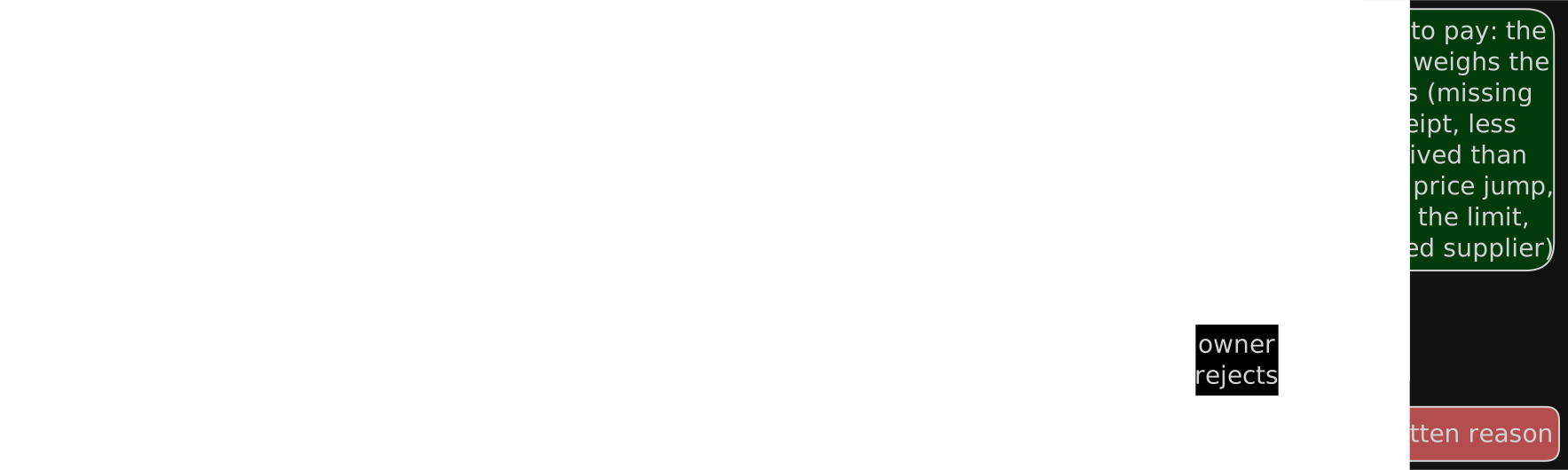
Each control returns a finding. Only two kinds stop an invoice, and no model can change them: HOLD (the supplier's wallet is missing, invalid or not confirmed by the supplier's signature, the bill repeats one already entered, or the invoice or its supplier is on hold in the ERP) and ASK (a first payment to a new wallet, or a bill for more than was received, answered by the owner in the dashboard or on Telegram). Everything else a control finds (a missing receipt, more billed than ordered, a price jump, an amount over the per-payment limit, a disabled supplier) is a NOTE: evidence the AI agent weighs before it decides to pay, hold or ask the owner.
Checks are small: one control per file under agent/guardrails/controls/. Each one returns a
finding with its evidence, so the reason on screen is the reason the rule used.
Who decides what
| Question | Decided by | Notes |
|---|---|---|
| Can the invoice be paid at all? | The rules | Only a wallet not yet proven or approved, or a duplicate bill, stops it. Fixed, testable, no model involved |
| Does what was billed make sense? | The AI model | It weighs the notes (receipt, quantities, price history, limits) and pays, holds or asks the owner, with its reason |
| Is this supplier's wallet safe? | The wallet control, then the owner | A new wallet waits for the supplier's signature and the owner's approval |
| What is paid now, and what waits for a date? | The AI model | It pays itself and reads the result; the gate refuses anything the rules forbid before it is sent |
| The owner's wallet on Arc is short: bring money from which chains? | The AI model | It reads the owner's Unified Balance on other chains and the fees of each split, and brings what it chooses. It only ever lands in the owner's own wallet on Arc, from chains where the owner authorized it |
| A payment did not go out: why, and who fixes it? | The AI model | It looks up the reason with its tools and tells the owner what only they can fix |
| Is the payment allowed on chain? | The shop contract | Limits, approved payee, once per invoice, pause |
Nothing leaves the owner's wallet until the owner authorizes payments in the dashboard and makes the shop's agent wallet the agent of the contract.
When the wallet on Arc is short
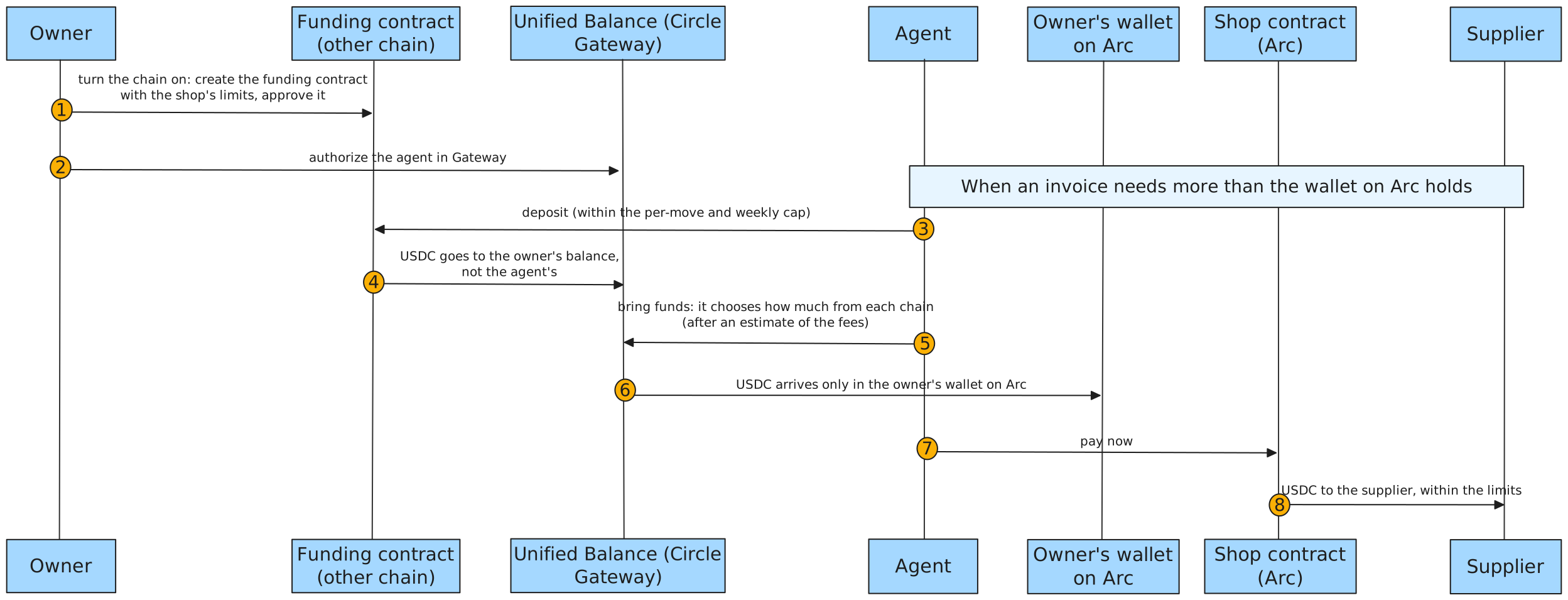
The owner may keep USDC on other chains too (Base Sepolia, Ethereum Sepolia). In the dashboard, under Which chains can the agent pay from?, the owner turns on the chains they want to use.
When an invoice needs more than the owner's wallet on Arc holds, the agent:
- looks at the owner's USDC on each chain, and at the fee of each way to move it,
- chooses where to take it from and how much,
- moves it into the owner's Unified Balance (Circle Gateway) and brings it to the owner's wallet on Arc,
- pays the invoice.
The money only goes to the owner's own wallet, and only from chains the owner turned on. On each of those chains a contract of the owner sets how much the agent can move at once and per week. The agent pays no gas: Circle covers its network fees.
Memory
Every decision, owner answer, wallet challenge and payment step is an event in an append-only
journal. Each time the agent works, the journal keeps every tool it called and, for the tools
that read balances, plans and invoices, the exact answer it read, so a decision can be checked
against what the agent saw. Each event stores the hash of the one before it. After money moves, and at least once a
day, the agent writes the Merkle root of the whole journal (RFC 9162) to the JournalAnchor
contract on Arc. A copy of the journal that was changed, cut or reordered gives a different
root, even if every hash in the chain was recomputed. embco verify checks the chain and every
root written on Arc. In the dashboard, Agent activity does the same check in the owner's browser
and downloads the journal, and each receipt shows what the agent read in the session that moved
it. Anyone can check a downloaded copy: see Audit the agent.


What the agent learns
The journal records what happened. What stays true, and is in no ERP record, the agent keeps in a few short memory files of its own (the AI model's standard memory tool):
owner.md: what the owner told it they want, for example "never pay this supplier more than 500 USDC at once without asking me",- one file per supplier: what it learned seeing it more than once,
shop.md: facts about the shop that change how it works.
Every time it is woken, it reads owner.md in full and the title of every other file. Code
holds a few lines whatever the model writes:
owner.mdchanges only when the owner wrote to the agent in that session, so what an invoice or an email says can never pass for the owner's wish,- no wallet address is kept: the ERP holds it and the supplier proves it by signing,
- only a session that finished keeps what it wrote, like its other choices,
- memory is never authority: limits, approved wallets and signatures are still enforced by the contract and the rules.
Owner answers
When the agent asks, the owner answers in one of three places. Each answer counts once and only for the question the agent last showed:
- the dashboard: approving a new wallet in the shop contract is also the answer,
- the ERP, on the invoice, from an account listed in
EMBCO_OWNER_USERS, - the command line, with
embco answer.
On Telegram the owner can talk to the agent, pause payments or stop it, but an answer to a question still goes through one of the three places above.
The agent's questions also reach the owner's chat, in the dashboard and on Telegram, once and in its own words. When only the owner's yes is missing they come with two buttons (yes, pay it / no, hold it). On an invoice the rules hold, a yes cannot pay it, so the buttons are a plain yes and no to the step the agent proposes, such as sending the supplier the request to confirm its wallet. A button press is only a message to the agent: it wakes it, and the agent decides. The chat button shows how many messages the agent sent since the owner last looked.
See Connect your ERPNext for the ERP side.